
NFC vs QR Code for Google Reviews: Which Is Easier for Customers?
NFC and QR codes can both send customers to your Google review page. The better option depends on where you ask, how customers interact, and how much friction you want to remove.
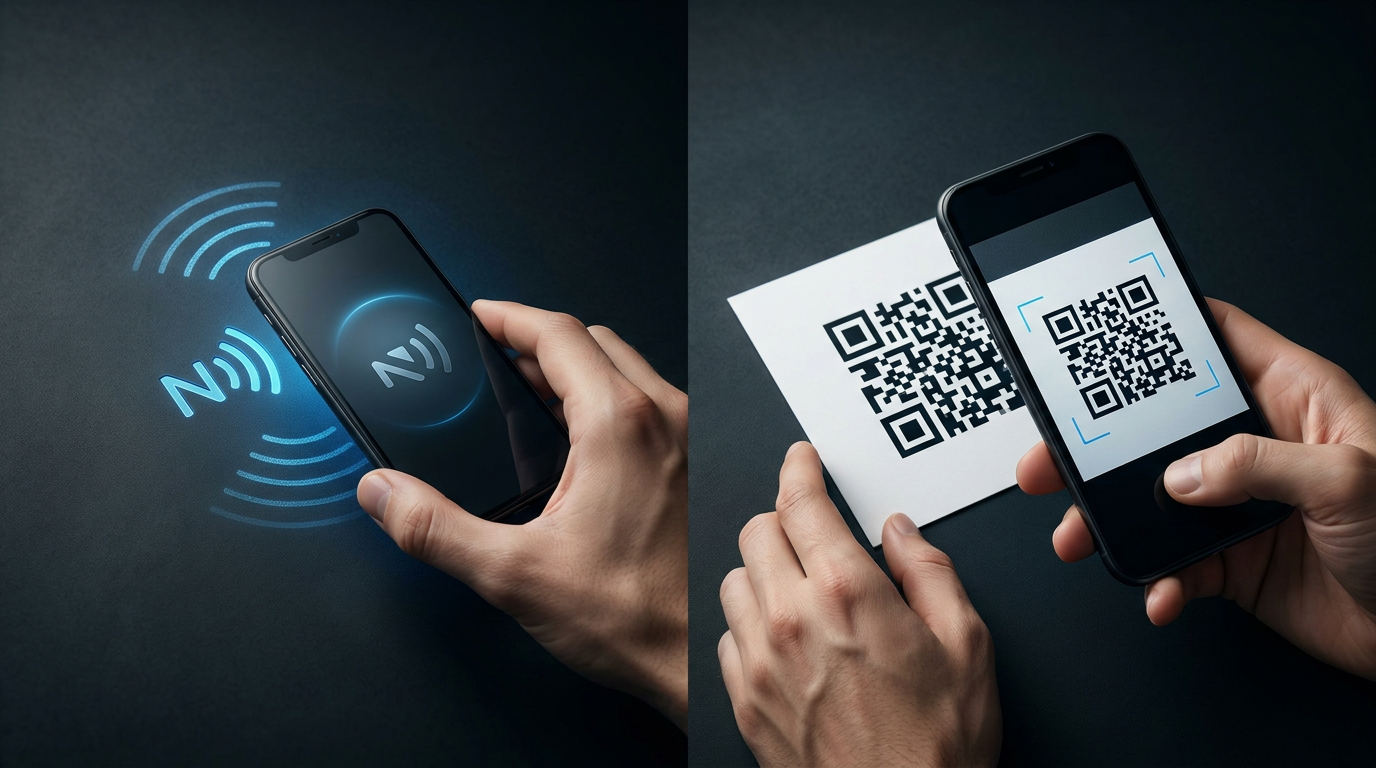
At first glance, they seem to do essentially the same job.
Customer has a phone.
Customer interacts with something.
Google review page opens.
But the interaction is different.
With a QR code, the customer typically opens the camera, points it at the code, waits for the link to appear, then Taps the link.
With NFC, the customer brings the correct part of a compatible phone close to the NFC tag, then follows the notification or link that appears.
Neither method is automatically better in every situation.
But for face-to-face review requests, the small differences matter.
NFC vs QR Code: The Quick Comparison
| Feature | NFC | QR Code |
|---|---|---|
| Requires camera | No | Usually yes |
| Requires NFC-compatible phone | Yes | No NFC required |
| Physical alignment matters | Yes, phone needs correct Tap area | Yes, code needs to be visible in camera |
| Works well at checkout | Excellent | Excellent |
| Works well for mobile service pros | Excellent | Good |
| Works well on printed flyers | Not by itself | Excellent |
| Can stay hidden inside a product | Yes | No, code must be visible |
| Requires customer to understand the interaction | Sometimes | Usually familiar |
| Can open a web link | Yes | Yes |
| Reusable | Yes | Yes |
Swipe sideways to see the full table.
The biggest difference is not where they lead.
It is how the customer gets there.
How a QR Code Review Request Works
A QR code is a visual code that a smartphone camera can recognize.
On an iPhone, Apple instructs users to open the Camera app, place the QR code inside the camera frame, then Tap the link that appears.
Google gives similar instructions for Pixel phones: open the camera, point it at the entire QR code, wait for the link, then Tap it.
That process is simple and familiar to a lot of people.
For a Google review request, it generally looks like this:
- Customer takes out phone.
- Customer opens camera.
- Customer points camera at QR code.
- Camera recognizes the code.
- Customer Taps the link.
- Review page opens.
That is a perfectly workable system.
How an NFC Review Request Works
NFC stands for Near Field Communication.
Instead of using the camera, the customer brings the NFC-reading area of a compatible phone close to the NFC tag.
For a web link, the interaction usually looks more like:
- Customer takes out phone.
- Customer Taps the NFC product.
- Notification or link appears.
- Customer opens it.
- Review page opens.
On supported iPhones, Apple allows compatible NFC tags to be detected in the background without first opening a dedicated NFC scanning app.
That is where NFC can feel especially fast.
The customer does not need to frame a code inside the camera.
They simply need to know where to Tap.
Where NFC Usually Has the Advantage
NFC becomes especially useful when the customer and business are already standing next to each other.
Think about:
- checkout counters
- reception desks
- service counters
- job completion
- customer walkthroughs
- trade shows
- mobile service appointments
In these situations, the NFC product is already physically there.
The interaction can be:
The customer does not have to:
- open the camera
- frame a code
- adjust the distance
- make sure the camera can clearly see the code
They Tap and continue.
That can make NFC feel more natural during an in-person conversation.
Where QR Codes Have the Advantage
QR codes have strengths that NFC does not.
Printed Materials
You can place a QR code on:
- receipts
- flyers
- postcards
- menus
- brochures
- packaging
- window signs
No electronic tag is required.
That makes QR extremely useful when you want to distribute a link through printed material.
Larger Signs
A QR code can be scanned from farther away.
NFC is intentionally short-range.
The phone needs to get very close to the tag.
A QR code on a wall sign or poster can be more practical when customers cannot physically get close enough to Tap something.
Broad Familiarity
Many customers already know what a QR code looks like.
They see the square pattern and understand:
NFC can occasionally require one sentence of explanation:
Once the customer understands it, the interaction is simple.
But QR has the advantage of being visually recognizable.
The Biggest NFC Learning Curve Is Knowing Where to Tap
This is the most important disadvantage of NFC to understand.
The NFC reader is not located in exactly the same place on every phone.
An iPhone generally reads near the top.
Samsung Galaxy phones can vary by model.
Google Pixel phones can vary by generation.
Motorola phones can vary by model and version.
If the customer Taps the wrong part of the phone, they may assume the NFC product does not work.
That is why we built the ReviewZaps NFC Tap Spot Finder.
Customers can select their exact phone and see where its NFC reading area is located.
QR Codes Have Their Own Friction Too
QR codes avoid the NFC Tap-position problem, but they introduce a different interaction.
The customer needs to use the camera or QR scanner.
The code also needs to be visible enough for the camera to recognize it.
Google's Pixel guidance recommends keeping the entire code inside the camera view, holding the phone steady, using good lighting, and adjusting the distance if scanning fails.
That does not make QR difficult.
It simply means QR is not friction-free either.
A tiny QR code printed on a glossy counter sign under bright lights can be less convenient than people expect.
A large, clear QR code in a well-lit location can work extremely well.
Execution matters.
Which Is Faster?
For an in-person interaction with a compatible phone and a customer who knows where to Tap, NFC can be the faster path.
The customer does not need to open the camera and frame the code.
That does not mean every NFC interaction will be faster.
If the customer spends 20 seconds Tapping the wrong part of the phone, QR would have been easier.
That is why staff instructions matter.
A business using NFC should know enough to say something simple like:
or:
When necessary, the Tap Spot Finder can settle the question quickly.
Which One Is Easier for Older Customers?
There is no universal answer.
Some customers are very comfortable scanning QR codes.
Others rarely use them.
Some people have used contactless payments for years and immediately understand the idea of Tapping their phone.
Others hear “NFC” and have no idea what it means.
This is one reason businesses should avoid technical explanations.
Do not say:
Say:
Simple instructions matter more than the technology name.
NFC vs QR at a Checkout Counter
A checkout counter is a strong NFC use case.
The customer is already physically close to the business.
A small NFC stand can stay in the same position every day.
The interaction becomes part of the natural checkout flow.
A QR code can also work well there.
But NFC has an advantage when you want the customer to interact with the review prompt without opening and aiming the camera.
Best Fit
ReviewZaps NFC Google Review Stand
The stand stays visible at the counter and can be reused customer after customer.
NFC vs QR for Mobile Service Businesses
Mobile professionals have a different problem.
There is no permanent counter.
A plumber might finish a job in a basement.
A landscaper might finish in a backyard.
A mobile detailer might be standing in a driveway.
A contractor might complete a walkthrough at a jobsite.
In these situations, carrying a small NFC review card is extremely convenient.
Pull out the card.
Ask for honest feedback.
Customer Taps.
Done.
A printed QR card can also work.
But the NFC interaction avoids having the customer open the camera and line up the code.
Best Fit
ReviewZaps NFC Google Review Card
It is small enough to stay in a wallet or pocket and can be used wherever the business goes.
NFC vs QR for Posters, Flyers and Mailers
QR wins here.
If you are mailing postcards, printing a flyer, placing a poster across a room, or putting a link on packaging, QR is usually the obvious choice.
You cannot Tap an NFC tag that is printed on a postcard unless an actual NFC tag has been physically added to it.
A printed QR code costs essentially nothing extra to reproduce once the design exists.
This is where trying to make NFC replace QR would make no sense.
Use the technology that fits the situation.
What About Using Both?
There is nothing wrong with using both NFC and QR.
A business might use:
- NFC at checkout
- NFC cards for employees
- QR codes on receipts
- QR codes in email
- QR codes on printed marketing materials
The customer does not care which technology wins.
They care whether getting to the review page is easy.
The right question is not:
It is:
The Review Request Matters More Than the Technology
A perfect NFC setup will not help much if nobody ever asks for reviews.
Neither will a beautifully designed QR code sitting unnoticed in the corner.
The technology solves the access problem.
The human interaction still matters.
The best moment is often when the customer is already happy with the experience and the result is fresh in their mind.
You do not need to pressure anyone.
You simply make honest feedback easy to access while the interaction is still happening.
Do NFC and QR Codes Affect Google Ranking Differently?
No.
Google does not care whether the customer reached your review page through:
- NFC
- QR code
- text message
- direct link
NFC and QR are simply ways to open the destination.
Neither technology gives a review extra ranking power.
The value is in reducing the steps between the customer's decision to leave feedback and the review page.
NFC Does Not Replace Good Review Practices
Using NFC does not mean every customer should be pushed into leaving a review before they leave.
The customer still decides whether they want to participate.
A good process should:
- ask for honest feedback
- avoid incentives
- avoid asking specifically for five stars
- avoid telling customers what to write
- avoid pressure
- make the review path easy
The technology should support the customer experience, not take it over.
What If an NFC Tap Does Not Work?
Do not immediately assume the NFC product is defective.
The most common thing to check first is the phone's Tap position.
Other possibilities include:
- NFC disabled on an Android phone
- a thick or magnetic phone case
- incompatible hardware
- Tapping too quickly
- the tag being placed near interfering metal
And for the fastest first check, use the NFC Tap Spot Finder.
So Which Is Better for Google Reviews?
If the customer is standing directly in front of you, NFC often provides the smoother interaction.
If the customer is viewing printed material, scanning from a distance, or receiving something they will use later, QR often makes more sense.
Choose NFC When:
- you ask for reviews face-to-face
- customers are physically close
- you want fewer camera steps
- employees carry the review prompt with them
- you have a checkout or front desk
- you want a reusable physical review tool
Choose QR When:
- the link is printed on marketing materials
- customers need to scan from farther away
- the interaction is not face-to-face
- adding an NFC tag would be unnecessary
- you want something easily reproduced in print
Use Both When:
Both methods naturally fit different parts of the customer journey.
There is no reason to force one technology into every situation.
Which ReviewZaps Product Fits Your Business?
NFC Google Review Card
Best for:
- contractors
- mobile technicians
- cleaners
- landscapers
- mobile detailers
- salespeople
- employees working away from a counter
- trade shows
The card is wallet-sized, reusable, and designed to stay with you.
NFC Google Review Stand
Best for:
- checkout counters
- reception desks
- salons
- auto service desks
- coffee shops
- clinics
- gyms
- retail stores
The stand stays visible where customers already interact with the business.
Both require no app or subscription.
The customer Taps with a compatible phone and gets a direct path to the business's Google review page.
NFC vs QR Code for Google Reviews: The Final Answer
QR codes are excellent at what they do.
NFC is excellent at what it does.
For face-to-face review collection, NFC often has the advantage because the customer can Tap instead of opening the camera and framing a code.
For printed materials and distance scanning, QR usually has the advantage.
The best choice depends on where your review request actually happens.
If it happens in a customer's driveway, carry a Card.
If it happens at a checkout counter, use a Stand.
If it happens on a mailed postcard, use a QR code.
Choose the method that removes the most unnecessary steps from that specific moment.


