
Google Review Card vs Google Review Stand: Which One Should Your Business Use?
Google Review Cards and Stands both make it easier for customers to reach your review page. The right choice depends on where your customer interaction happens.
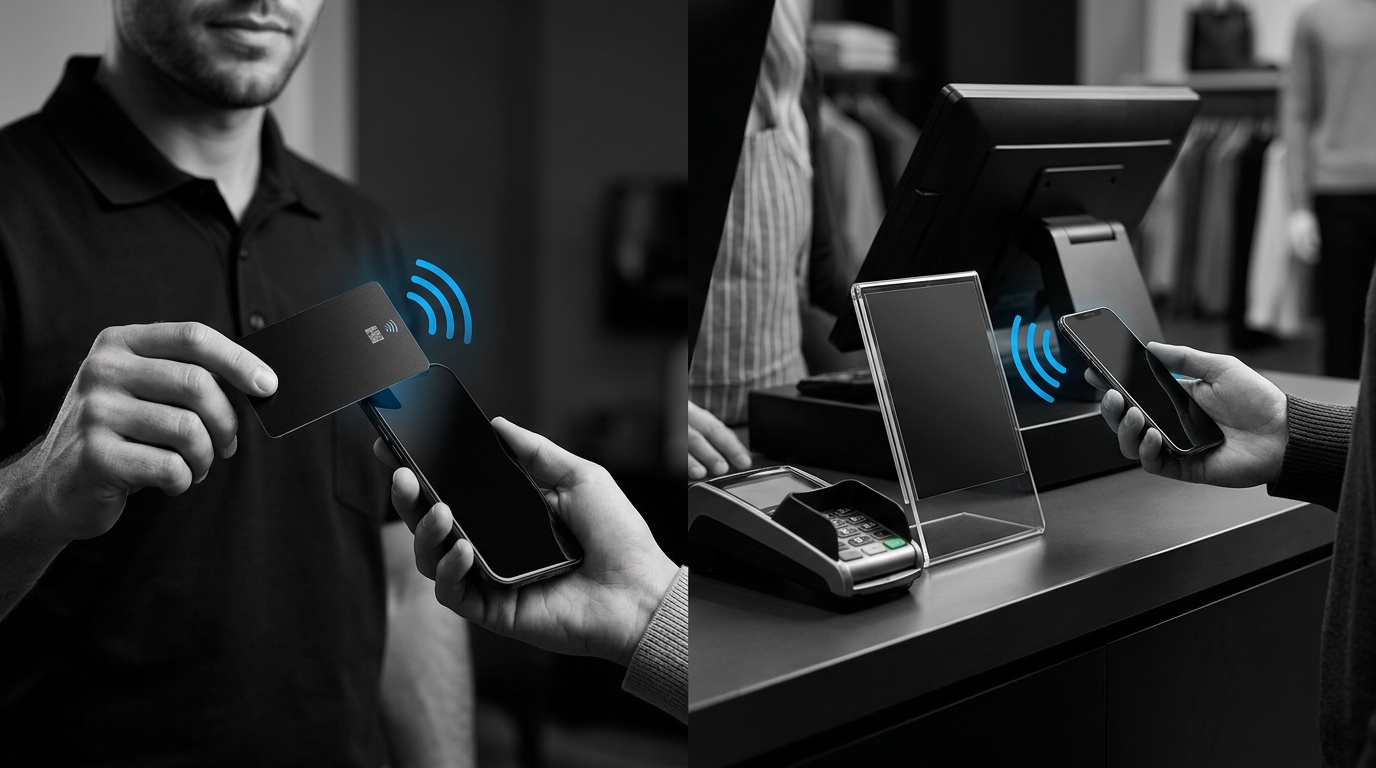
If you are deciding between an NFC Google Review Card and an NFC Google Review Stand, the technology inside them is not the biggest difference.
The real difference is where the review request happens.
A Card is designed to move with you.
A Stand is designed to stay where customers already stop.
That sounds simple, but it makes one format much better than the other for certain businesses.
Google Review Card vs Stand: Quick Comparison
| Feature | NFC Google Review Card | NFC Google Review Stand |
|---|---|---|
| Best for | Mobile and on-the-go businesses | Fixed locations and counters |
| Portable | Yes | Usually stays in one place |
| Fits in wallet or pocket | Yes | No |
| Good for job sites | Excellent | Not ideal |
| Good for checkout counters | Good | Excellent |
| Good for reception desks | Good | Excellent |
| Easy for employees to carry | Excellent | Not designed for that |
| Always visible to customers | Only when presented | Yes |
| Reusable | Yes | Yes |
| Requires an app | No | No |
| Subscription required | No | No |
Swipe sideways to see the full table.
Both can send a customer directly toward the same Google review destination.
The difference is how they fit into your customer experience.
Choose a Google Review Card When the Business Goes to the Customer
The NFC Google Review Card is built for businesses where the interaction happens somewhere other than a permanent front counter.
Think about:
- contractors
- plumbers
- electricians
- cleaners
- landscapers
- mobile detailers
- mobile mechanics
- pest control technicians
- salespeople
- delivery or installation teams
- field service professionals
The employee finishes the job.
The customer is satisfied.
There may be no register, front desk, or reception counter anywhere nearby.
That is where the Card makes sense.
It can stay in a wallet, pocket, work bag, or vehicle until the moment arrives.
The Card Follows the Employee
Imagine a mobile detailer finishing a customer's vehicle.
The customer walks outside, sees the finished work, and says:
That is a natural review moment.
The detailer does not need to tell the customer:
The ReviewZaps NFC Google Review Card can already be in their pocket.
If the customer wants to leave feedback, they can Tap the Card with a compatible phone and get a direct path to the review page.
That is exactly the kind of interaction where portability matters.
Choose a Google Review Stand When Customers Pass the Same Spot
A Stand solves a different problem.
Instead of following the employee, it stays in one predictable location.
That works especially well for:
- salons
- barbershops
- restaurants
- coffee shops
- auto repair shops
- dental offices
- clinics
- gyms
- fitness studios
- retail stores
- front desks
- reception areas
Customers already approach the counter.
They already stop there.
They may pay, schedule another appointment, pick something up, or speak with an employee before leaving.
A ReviewZaps NFC Google Review Stand can remain visible in that exact location.
The Stand Stays in the Review Moment
Imagine a salon client checking out after a haircut.
They are already standing at the counter.
They have just seen the finished result.
A permanent Stand means the review option is right there without an employee needing to pull something from a pocket.
The customer can Tap if they want to leave feedback.
The Stand remains there for the next customer.
The Simplest Way to Decide
Ask yourself one question:
If the answer is:
choose the Card.
If the answer is:
choose the Stand.
That one question will solve the decision for most businesses.
Card Example: Contractor
A contractor finishes a remodeling project and walks the homeowner through the completed work.
The homeowner is happy.
There is no checkout counter.
There is no front desk.
The review moment is happening inside the customer's home.
The contractor can keep the Card with them and present it when the moment is appropriate.
Stand Example: Auto Repair Shop
The customer returns to pick up their vehicle.
The service advisor explains what was repaired.
The customer pays at the service desk.
That counter is a repeatable customer touchpoint.
The Stand can stay beside the payment terminal or service counter every day.
Card Example: Mobile Detailer
The business operates out of a van or trailer.
Every appointment happens at a different location.
The review request happens in a driveway, parking lot, or workplace.
A countertop Stand would not solve much if there is no countertop.
Stand Example: Barbershop
Almost every customer eventually reaches the front counter.
The business does not need the review tool moving around the shop all day.
It can remain visible at checkout and become part of the normal customer flow.
What If Multiple Employees Need to Ask for Reviews?
This is where Cards become particularly useful.
Suppose you run:
- an HVAC company with six technicians
- a cleaning company with multiple crews
- a landscaping company
- a roofing company
- a real estate team
- a mobile detailing company with several employees
A Stand sitting back at the office does nothing for an employee who is finishing a job across town.
Cards can be distributed to the people who actually interact with customers.
Each employee can have the review option with them when the service is completed.
One Location, Multiple Employees
A fixed-location business is different.
If five employees all bring customers to the same front desk, you may not need five separate review tools.
One or more Stands in strategic customer areas may be enough.
The physical customer journey matters more than the employee count alone.
What If My Business Has Both Mobile and In-Store Customers?
Then you may not need to choose.
Some businesses naturally benefit from both.
Imagine an auto business with:
- technicians working off-site
- a permanent service counter
- customers picking vehicles up at the shop
Cards can travel with employees.
A Stand can stay at the counter.
Or imagine a fitness business that attends community events but also operates a studio.
A Card can travel to events.
A Stand can remain at reception.
Using Both Is Not Redundant
The two products solve different placement problems.
A Card handles portable interactions.
A Stand handles fixed interactions.
If your customers experience both, using both can make sense.
Which One Is Less Awkward to Ask Customers to Use?
Neither should feel awkward when the request is handled naturally.
The important part is not the shape of the NFC product.
It is the timing.
If a customer just said:
that is a natural opening.
You might simply say:
With a mobile business, you present the Card.
At a counter, you point to the Stand.
Then let the customer decide.
Cards Are Better When You Need Control Over When the Review Prompt Appears
A Card usually stays out of sight until the employee chooses to present it.
That can be useful.
You are not putting a review request in front of every person automatically.
Instead, the employee has the tool available when the interaction makes sense.
That works well for businesses where the customer experience varies from job to job.
Stands Are Better When Visibility Does Some of the Work
A Stand does not have to be pulled from anywhere.
It is already visible.
That is useful when customers repeatedly stop at the same location.
A customer may even notice it without an employee making a formal review request.
That makes Stands particularly well suited for:
- checkout
- front desks
- waiting areas
- reception counters
- service counters
The review option becomes part of the physical environment.
Which One Is Easier for Customers?
The NFC interaction itself is essentially the same idea.
The customer brings a compatible phone close to the NFC area.
The important part is using the correct part of the phone.
NFC readers are not located in exactly the same place on every phone.
If a customer has trouble, the ReviewZaps NFC Tap Spot Finder can show the likely Tap area for their specific phone model.
That applies whether they are using a Card or Stand.
What If a Customer Prefers a QR Code?
That is a separate technology decision.
QR codes are useful for:
- printed flyers
- receipts
- posters
- postcards
- packaging
- situations where customers scan from farther away
NFC is particularly useful when the customer is physically close to the review product.
The Card vs Stand decision assumes you have already decided that NFC fits the interaction.
Should a Restaurant Use Cards or Stands?
Usually, a Stand.
Restaurants typically have repeatable customer locations:
- host stand
- register
- checkout counter
- pickup counter
A Stand can remain there permanently.
Cards may still make sense if servers or staff members need a portable option, but most restaurants have at least one obvious fixed customer touchpoint.
Should a Contractor Use a Card or Stand?
Usually, a Card.
The business goes to the customer.
The review request happens where the work was completed.
The employee can keep the Card with them instead of trying to create a permanent review station.
Should a Salon Use a Card or Stand?
Usually, a Stand.
Most clients eventually reach reception or checkout.
That gives the business a consistent place for the review tool.
Individual stylists could carry Cards if they work independently, rent chairs, work off-site, or interact with clients away from a shared checkout.
Should a Real Estate Agent Use a Card or Stand?
Usually, a Card.
Real estate professionals meet clients in:
- homes
- offices
- coffee shops
- closings
- showings
- open houses
A portable review tool fits that lifestyle better than something designed to stay on a countertop.
Should a Dentist or Medical Office Use a Card or Stand?
Usually, a Stand.
Customers generally check in or out through reception.
That creates a predictable place for a permanent review option.
The review request should always remain optional and appropriate to the customer interaction.
Should You Buy One or Several?
Think about customer interaction points, not just business size.
A small shop may only need one Stand.
A larger location might benefit from several if customers use different counters.
A mobile business with several technicians may want a Card for each employee.
A business with both field staff and a physical office may use Cards and Stands together.
The question is:
Put the review option where those interactions actually occur.
Card vs Stand Is Really About Customer Flow
It is easy to look at these products and think:
That is not the most useful question.
Instead ask:
- Where does the service end?
- Where does the customer express satisfaction?
- Where is the employee at that moment?
- Is there a permanent counter nearby?
- Does the review tool need to move with the employee?
Those answers usually make the decision obvious.
Choose the NFC Google Review Card If:
- your business travels to customers
- employees work in the field
- you do not have a permanent checkout counter
- the review request happens at job completion
- you want something that fits in a wallet or pocket
- multiple employees need their own portable review tool
Choose the NFC Google Review Stand If:
- customers visit your location
- most customers pass the same counter
- you have a reception desk
- you have a checkout area
- you want the review option permanently visible
- multiple customers use the same physical customer touchpoint
Choose Both If Your Business Has Both Types of Interaction
Some businesses do not fit neatly into one category.
You might have:
- employees in the field
- customers visiting your location
- events outside the business
- multiple service channels
- both mobile and fixed-location interactions
In that case, Cards and Stands complement each other.
The Card follows the business.
The Stand stays with the location.
Google Review Card vs Stand: The Final Answer
Choose the Card when the review request needs to travel.
Choose the Stand when the review request should stay in one predictable customer location.
And use both when your business operates in both environments.
The underlying goal is the same:
Make it easier for a customer who wants to leave feedback to reach the correct review page while the experience is still fresh.
You do not need to turn review collection into a complicated system.
Put the right tool where the customer interaction already happens.


